
前言
在开发中最长遇到的就是文本换行对齐,直接通过Row布局参数不调对会导致左侧标题在右侧换行的中心位置,显示的不好看,后面在经过测试后续可以直接用简单粗暴的方法
实现
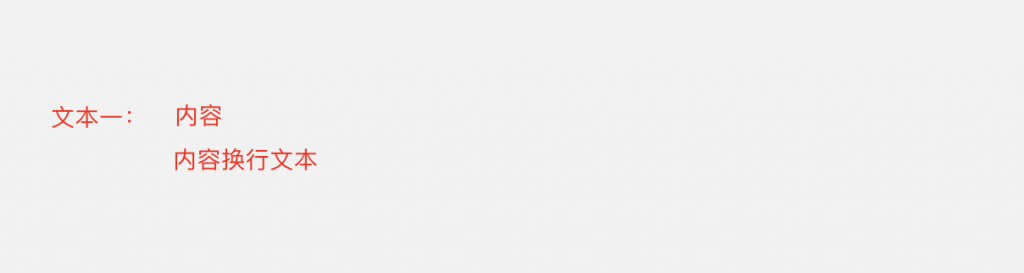
这个是我们最终目标
                  Padding(
                    padding: const EdgeInsets.only(bottom: 4.0),
                    child: Row(
                      mainAxisAlignment: MainAxisAlignment.spaceEvenly,
                        crossAxisAlignment: CrossAxisAlignment.start,
                        children: [
                      if (prefix != "")
                        Container(
                          child: Text(
                            "$prefix ",
                            style: TextStyle(
                              fontFamily: 'HeiTi',
                              letterSpacing: 2.rpx,
                              fontWeight: FontWeight.bold,
                              color: Color.fromRGBO(187, 17, 25, 1),
                              fontSize: 30.rpx,
                              overflow: TextOverflow.ellipsis,
                            ),
                          ),
                        ),
                      Container(
                        child: Text(
                            "文本一:",
                            style: TextStyle(
                              fontFamily: 'HeiTi',
                              letterSpacing: 2.rpx,
                              fontWeight: FontWeight.bold,
                              color: Color.fromRGBO(187, 17, 25, 1),
                              fontSize: 30.rpx,
                              overflow: TextOverflow.ellipsis,
                            )),
                      ),
                      Expanded(
                        child: Container(
                          child: Text(
                              “内容……内容换行文本",
                              style: TextStyle(
                                fontFamily: 'HeiTi',
                                letterSpacing: 2.rpx,
                                fontWeight: FontWeight.bold,
                                color: Color.fromRGBO(221, 75, 37, 1),
                                fontSize: 30.rpx,
                              )),
                        ),
                      )
                    ]),
                  ),
只用确保Row的参数是这个就能轻松完成!
                      mainAxisAlignment: MainAxisAlignment.spaceEvenly,
                        crossAxisAlignment: CrossAxisAlignment.start,